
Acubiz supports automated and flexible data export to your company’s external systems, including ERP, financial, and payroll systems. The specific export files required depend entirely on your company's individual configuration and workflow.
Acubiz supports the following standard exports:
- Provision of Credit Card Transactions: Export of arrival registrations and provisions/accruals.
- Settled Expenses: Export of approved and posting-ready travel expenses and out-of-pocket disbursements.
- Invoiced Credit Card Transactions: Export of matched and validated corporate card transactions.
- Payroll-Related Expenses: Direct transfer of taxable or payroll-relevant allowances (e.g., mileage or per diem) to the payroll system.
Procedure: How to Export
The following section outlines the process for exporting settled expenses (travel expense reports):
To get started, go to: FINANCE --> EXPORT --> READY FOR EXPORT
Here, you'll see the settled costs that are ready to be exported to your ERP system.
Next, click on Export all.
Select the export profile you'd like to use. For this example, choose 1. Cost (Expense reports ...). Then, click Start Export.
Acubiz will create an export report, and you'll be able to download the export file.
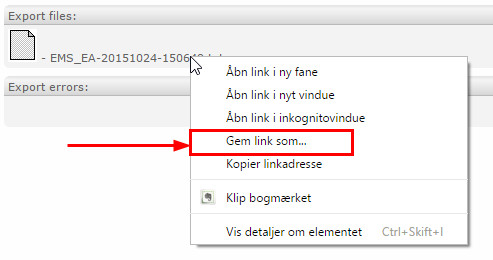
Right-click on the file name and choose "Save link as."
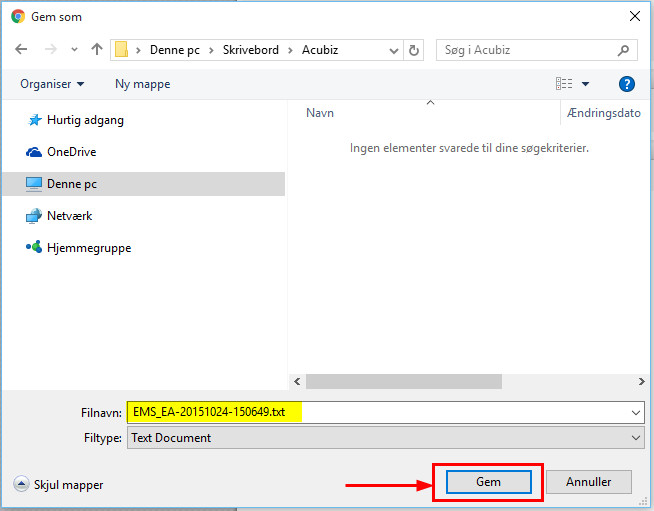
Select a location to save the file and click Save.
Comments
0 comments
Please sign in to leave a comment.